
Anúncios
Measuring tools have evolved significantly in the digital age, and tape measure apps now offer precision and convenience right in your pocket.

Gone are the days when you needed to carry bulky measuring tools for simple tasks around the house or at work. With smartphone technology advancing rapidly, tape measure applications have become incredibly accurate and user-friendly, transforming how we approach everyday measurement challenges.
Anúncios
Whether you’re a DIY enthusiast planning your next home improvement project, a professional contractor working on-site, or simply someone who needs to measure furniture before purchasing, these innovative apps provide practical solutions that combine cutting-edge augmented reality with intuitive design. 📱
Understanding How Tape Measure Apps Actually Work
Modern tape measure applications leverage your smartphone’s advanced sensors and cameras to deliver surprisingly accurate measurements. The technology behind these apps has improved dramatically over recent years, making them reliable tools for various measuring tasks.
Anúncios
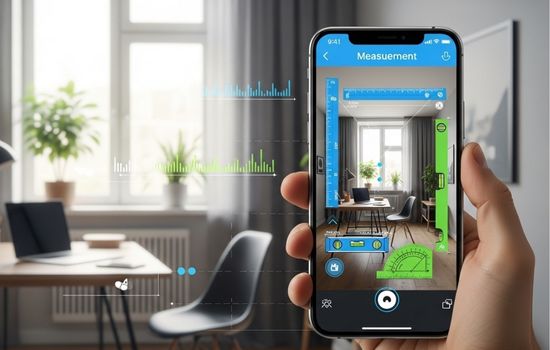
Most apps utilize augmented reality (AR) technology combined with your device’s camera system. When you point your phone at an object, the app creates a virtual overlay that allows you to mark starting and ending points, calculating the distance between them with remarkable precision.
The accuracy depends on several factors, including your phone’s camera quality, the lighting conditions, and how steady you hold the device. Premium smartphones with advanced depth sensors and LiDAR technology can achieve accuracy within millimeters for short distances.
Key Technologies Behind Digital Measuring Tools
Several technological components work together to make these applications functional and accurate:
- Augmented Reality (AR): Creates virtual measuring lines overlaid on real-world objects through your camera view
- LiDAR Sensors: Available on newer smartphones, these emit laser pulses to measure distances with exceptional accuracy
- Gyroscope and Accelerometer: Help determine your phone’s orientation and movement for proper calibration
- Image Processing Algorithms: Analyze visual data to detect surfaces, edges, and reference points
- Camera Calibration: Ensures measurements account for lens distortion and focal length variations
Top Features to Look for in a Measuring App
Not all tape measure apps are created equal. Understanding which features matter most can help you choose the right application for your specific needs. 🔍
The best applications offer more than basic linear measurements. They provide comprehensive toolsets that replace multiple traditional measuring instruments, saving space in your toolkit while expanding your capabilities.
Essential Measurement Capabilities
A quality tape measure app should offer versatile measurement options that cover various scenarios:
- Linear distance measurements in multiple units (inches, feet, centimeters, meters)
- Height measurement for objects and people
- Area calculation for floors, walls, and surfaces
- Volume measurement for three-dimensional spaces
- Angle measurement for precise installations
- Path length for irregular shapes and curves
Advanced Functionality Worth Considering
Beyond basic measurements, modern apps incorporate features that enhance usability and professional application:
Automatic Surface Detection: Smart apps can identify planes and surfaces automatically, speeding up the measurement process significantly. This feature proves particularly valuable when measuring rooms or large objects.
Photo and Video Integration: Capture measurements directly on photos or videos, creating visual records you can share with clients, contractors, or family members. This documentation capability proves invaluable for project planning and collaboration.
Measurement History: Save and organize your measurements for future reference, with options to add notes, labels, and project categorization. Professional users especially appreciate this organizational capability.
Export and Sharing Options: Send measurements via email, text, or cloud storage in various formats including PDF, image files, or spreadsheet data.
Practical Applications for Home and Professional Use
Tape measure apps serve countless purposes across various contexts, from casual home use to professional construction projects. Understanding these applications helps you maximize the value of these digital tools.
Home Improvement and Interior Design
Homeowners and renters find these apps incredibly useful for everyday tasks. Before purchasing furniture, you can quickly measure spaces to ensure proper fit. Planning room layouts becomes simpler when you can instantly capture dimensions without juggling physical measuring tapes.
Hanging artwork or mirrors at the perfect height requires accurate measurements, and apps provide quick reference points. When shopping for curtains, blinds, or area rugs, having precise window and floor measurements on your phone ensures you buy the right sizes the first time. 🏠
Professional Construction and Contracting
Contractors, architects, and construction professionals increasingly incorporate measuring apps into their workflows. For preliminary site assessments and quick estimates, these apps provide convenient alternatives to traditional tools.
While they may not replace precision instruments for final installations, they excel at gathering initial measurements, documenting site conditions, and communicating spatial information to clients. The ability to photograph measurements proves particularly valuable during client consultations and project proposals.
Real Estate and Property Management
Real estate professionals use measuring apps to quickly assess property dimensions, calculate square footage, and verify listing information. Property managers find them useful for documenting unit conditions and planning maintenance projects.
The visual documentation features help create detailed property records that can be shared with prospective buyers, tenants, or service providers without requiring multiple site visits.
Accuracy Considerations and Best Practices
While tape measure apps offer impressive convenience, understanding their limitations and optimal use conditions ensures reliable results. Knowing when to trust app measurements versus using traditional tools represents an important skill.
Factors Affecting Measurement Accuracy
Several environmental and technical factors influence how accurately these apps perform:
- Lighting Conditions: Adequate, even lighting produces the best results; dim or harsh lighting can reduce accuracy
- Surface Texture: Plain surfaces with clear edges measure more accurately than complex or reflective surfaces
- Distance Range: Most apps perform best at medium distances (3-15 feet); very close or distant measurements may lose precision
- Device Capabilities: Newer phones with advanced sensors naturally deliver better results than older models
- User Steadiness: Keeping your phone stable during measurement improves accuracy significantly
Tips for Maximum Accuracy
Follow these practices to get the most reliable measurements from your app:
Calibrate Regularly: Many apps include calibration features that optimize performance for your specific device. Running calibration before important measurements improves reliability.
Use Reference Objects: When possible, include objects of known size in your measurement frame. This provides a validation checkpoint for your results.
Take Multiple Measurements: For critical dimensions, measure the same distance several times from slightly different angles. Consistent results indicate reliable measurements.
Maintain Proper Distance: Position yourself at the optimal distance from your target—usually 5-10 feet for most room measurements. Too close or too far reduces accuracy.
Ensure Good Lighting: Natural daylight or bright, diffused indoor lighting produces the best results. Avoid measuring in shadows or under harsh directional lighting. ☀️
Comparing Physical Tape Measures and Digital Apps
Both traditional and digital measuring tools have distinct advantages and appropriate use cases. Understanding these differences helps you choose the right tool for each situation.
| Feature | Physical Tape Measure | Measuring App |
|---|---|---|
| Accuracy | ±1/16 inch consistently | ±1/4 inch to ±1 inch depending on conditions |
| Convenience | Requires carrying separate tool | Always available on your phone |
| Hard-to-reach Areas | Limited by tape length and accessibility | Can measure distant objects via camera |
| Documentation | Requires manual recording | Automatic save with photo evidence |
| Learning Curve | Minimal—intuitive to use | Requires brief familiarization |
| Battery/Power | No power required | Drains phone battery moderately |
| Cost | $5-30 for quality models | Free to $10 for premium versions |
Privacy and Permission Considerations
Like many smartphone applications, tape measure apps require certain permissions to function properly. Understanding what access they need and why helps you make informed decisions about your privacy. 🔒
Camera access represents the most obvious requirement—without it, the app cannot capture the visual information needed for measurements. Some apps also request photo library access to save measurement images alongside your other photos.
Location services may be requested for professional apps that organize measurements by job site or property location. This helps contractors and service professionals keep projects organized geographically.
Before installing any measuring app, review its privacy policy and permissions list. Reputable apps clearly explain why each permission is necessary and how your data will be used or protected.
Integration with Other Tools and Workflows
Modern measuring apps don’t exist in isolation—they increasingly integrate with other professional and productivity tools to create seamless workflows.
Many professional-grade apps offer cloud synchronization, allowing measurements to transfer automatically across devices. This means you can measure on-site with your phone, then access those measurements on your tablet or computer for detailed planning.
Export functionality enables compatibility with design software, spreadsheets, and project management platforms. Contractors can transfer measurements directly into estimation software, while interior designers can import dimensions into CAD programs. 💼
Some advanced applications connect with smart home systems or building information modeling (BIM) platforms, creating integrated ecosystems where physical space measurements inform digital planning and automation systems.
Future Developments in Measurement Technology
The evolution of tape measure apps continues rapidly as smartphone technology advances. Understanding emerging trends provides insight into future capabilities that will further enhance these tools.
LiDAR technology, currently available only on premium devices, will likely become standard across more smartphones. This sensor technology dramatically improves measurement accuracy and enables new features like detailed 3D room mapping and object recognition.
Artificial intelligence integration promises smarter apps that can automatically identify objects, suggest appropriate measurements, and even detect measurement errors before you save them. Machine learning algorithms will improve surface detection and measurement precision over time.
Augmented reality features will become more sophisticated, potentially overlaying furniture previews, design visualizations, or installation guides directly onto your camera view with perfect scale and positioning.
Maximizing Value from Your Measuring App
Getting the most from your tape measure app involves more than just pointing and clicking. Developing good measurement habits and understanding advanced features unlocks the full potential of these digital tools.
Explore your app’s settings menu to discover customization options. Many apps allow you to set preferred units, adjust sensitivity, configure automatic saves, and personalize the interface to match your workflow preferences.
Take advantage of tutorial features and help documentation. Most quality apps include guided tours or instructional videos that reveal useful features you might otherwise overlook. Spending 10 minutes learning these capabilities can save hours of frustration later. 📚
Create organizational systems for saved measurements. Use naming conventions, project folders, or tags that make sense for your needs. A well-organized measurement library becomes a valuable reference resource over time.
Making the Right Choice for Your Needs
Selecting the ideal tape measure app depends on your specific requirements, budget, and the type of projects you typically handle. Free versions often provide sufficient functionality for casual users, while professionals may benefit from premium features available through paid subscriptions or one-time purchases.
Consider starting with a free app to familiarize yourself with digital measurement concepts. As you develop comfort and identify specific features you need, you can upgrade to more advanced options if necessary.
Read user reviews and pay attention to comments about accuracy, ease of use, and customer support responsiveness. Apps with active development teams that regularly release updates and improvements typically provide better long-term value.
Test the app in various conditions before relying on it for important projects. Verify measurements against known dimensions to build confidence in the results. This practice helps you understand when the app performs optimally and when traditional tools might be more appropriate. ✅
Embracing the Digital Measurement Revolution
Tape measure apps represent a significant step forward in making measurement tasks more accessible, convenient, and efficient. While they don’t completely replace traditional tools in all scenarios, they complement existing methods and often provide superior solutions for everyday measuring challenges.
The technology continues improving rapidly, with each generation of smartphones bringing enhanced sensors and processing capabilities that translate into better app performance. As these tools become more accurate and feature-rich, their applications expand across more professional contexts.
Whether you’re measuring for a major renovation, checking if a new sofa will fit through your doorway, or quickly documenting dimensions for a work project, having a capable measuring app on your phone provides peace of mind and practical utility. The convenience of always having measurement capabilities in your pocket eliminates those frustrating moments when you need dimensions but don’t have physical tools available.
By understanding how these apps work, what features matter most, and how to use them effectively, you can transform your smartphone into a versatile measuring instrument that serves you reliably across countless situations. The digital measurement revolution has arrived, and it fits perfectly in your pocket. 📏✨
