
Anúncios
Old photographs hold irreplaceable memories, but time often fades their beauty. Fortunately, modern technology offers powerful solutions to bring these treasures back to life.

We’ve all experienced that bittersweet moment when flipping through old family albums. The yellowed edges, faded colors, mysterious scratches, and water stains tell their own story of time’s passage. These images capture moments that can never be recreated—grandparents in their youth, childhood memories, historical events witnessed by previous generations.
Anúncios
The emotional value of vintage photographs transcends their physical condition. Whether it’s a wedding portrait from the 1950s or a candid snapshot from a summer vacation decades ago, each image represents a portal to the past. Today’s photo restoration applications leverage artificial intelligence and advanced algorithms to repair damage, enhance clarity, and even colorize black-and-white images with remarkable accuracy.
📸 Why Old Photos Deteriorate Over Time
Understanding the science behind photographic deterioration helps us appreciate the restoration process. Traditional photographs consist of light-sensitive chemicals on paper, which react to environmental factors in predictable ways.
Anúncios
Humidity creates the perfect breeding ground for mold and mildew, leaving permanent stains. Ultraviolet light from sunlight breaks down chemical bonds in both the image dyes and paper fibers, causing fading and brittleness. Temperature fluctuations accelerate these chemical reactions, while simple handling introduces oils and dirt from our fingers.
Older photographic processes are particularly vulnerable. Albumen prints from the 19th century typically turn brown. Color photos from the 1970s and 1980s often suffer from magenta or cyan shifts as different dye layers fade at different rates. Even seemingly protected photographs stored in albums can deteriorate if the album materials themselves contain acids that attack the images.
🤖 How AI-Powered Restoration Apps Work Their Magic
Modern restoration applications employ sophisticated artificial intelligence trained on millions of images. These neural networks learn to recognize patterns of damage and understand what intact photographs should look like.
The process begins when you upload or photograph your damaged image. The AI analyzes the picture in multiple passes, identifying scratches, tears, stains, and missing portions. It then reconstructs damaged areas by referencing surrounding pixels and applying learned patterns from its training data.
Advanced colorization features analyze the grayscale values in black-and-white photos to predict original colors. The AI considers historical context, typical color palettes from different eras, and logical assumptions—skin tones appear natural, grass appears green, skies look blue unless sunset is indicated by shadow patterns.
Face enhancement algorithms specifically target facial features, adding detail and sharpness to help you see your ancestors’ expressions more clearly. Some applications can even remove the red-eye effect common in flash photography or adjust contrast to bring out hidden details in shadows.
🔍 Key Technologies Behind the Scenes
Several cutting-edge technologies work together in these applications:
- Convolutional Neural Networks (CNNs): Specialized for image recognition and pattern detection
- Generative Adversarial Networks (GANs): Create realistic reconstructions of missing or damaged portions
- Super-resolution algorithms: Increase image resolution and sharpness without introducing artifacts
- Color transfer models: Apply historically accurate colorization to monochrome images
- Noise reduction filters: Remove grain and digital artifacts while preserving authentic detail
💡 Top Features to Look for in Photo Restoration Apps
Not all restoration applications offer the same capabilities. When choosing the right tool for your precious memories, consider these essential features that separate exceptional apps from mediocre ones.
Automatic enhancement should handle common issues like color correction, contrast adjustment, and basic scratch removal with a single tap. This gives you a quick preview of what’s possible before diving into more detailed work.
Manual editing tools provide the control needed for challenging restorations. Look for applications that offer selective healing brushes, clone stamp functionality, and the ability to adjust restoration intensity in specific areas.


High-resolution export capabilities ensure your restored images maintain quality whether you’re printing them for framing or sharing digitally. The best apps preserve maximum detail and allow you to save in multiple formats including JPEG, PNG, and even TIFF for archival purposes.
Batch processing becomes invaluable when restoring entire albums. This feature applies consistent enhancements across multiple photos, saving hours of repetitive work while maintaining visual coherence across your collection.
🎨 Colorization: Bringing Black and White to Life
The ability to add realistic color to vintage black-and-white photographs represents one of the most impressive features modern apps offer. This isn’t simple tinting—sophisticated AI analyzes textures, patterns, and contextual clues to predict accurate colors.
Quality colorization considers historical accuracy. The AI understands that fabric patterns, architectural details, and fashion from different decades had characteristic color palettes. A dress from the 1920s receives period-appropriate colors, while a 1960s automobile gets era-accurate paint hues.
The best applications allow manual color correction, letting you adjust specific elements if the AI makes incorrect assumptions. You might need to correct hair color, adjust clothing tones, or modify background elements to match your knowledge of the original scene.
🛠️ Step-by-Step Guide to Restoring Your First Photo
Starting your restoration journey doesn’t require technical expertise. Follow this straightforward process to transform damaged photographs into pristine memories.
Step 1: Digitize Your Photo
If your image isn’t already digital, photograph it in good lighting or use a scanner. Ensure the entire photograph is visible and evenly lit without glare or shadows. Higher resolution captures provide better restoration results.
Step 2: Choose Your Application
Select a restoration app that matches your needs and skill level. Begin with user-friendly options that offer automatic enhancements before exploring more complex professional tools.
Step 3: Upload and Assess
Import your image and take note of specific damage—tears, fading, discoloration, or missing sections. Understanding the problems helps you choose appropriate tools.
Step 4: Apply Automatic Restoration
Start with one-tap automatic enhancement. This immediately addresses common issues and gives you a baseline for further improvements.
Step 5: Manual Fine-Tuning
Address remaining problems using manual tools. Remove stubborn scratches, fill missing corners, adjust color balance, and enhance facial details.
Step 6: Colorize if Desired
For black-and-white photos, apply AI colorization and refine results. Remember that colorization is subjective—choose tones that feel right to you.
Step 7: Final Adjustments
Review your work at 100% zoom, checking for unnatural artifacts or areas needing additional attention. Adjust sharpness, contrast, and saturation for a polished final result.
Step 8: Save and Backup
Export your restored image in high resolution and create multiple backups. Consider cloud storage, external drives, and printed copies to ensure these digital restorations last for future generations.
📱 Mobile vs Desktop Restoration Solutions
Both mobile apps and desktop software offer distinct advantages for photo restoration work. Understanding these differences helps you choose the right platform for your projects.
Mobile applications excel in convenience and accessibility. You can restore photos anywhere, immediately digitize physical prints using your phone’s camera, and share results instantly with family members. Modern smartphones possess surprising processing power, handling AI-intensive tasks that once required desktop computers.
The touchscreen interface feels natural for certain tasks like painting over scratches or selecting specific areas for enhancement. Many mobile apps also integrate cloud storage, automatically backing up your work and syncing across devices.
Desktop solutions typically offer more advanced features and greater precision. Larger screens make detailed work easier, while mouse and keyboard controls provide finer adjustments than touchscreen gestures. Processing power on desktop computers handles extremely high-resolution images and complex restoration tasks more efficiently.
Professional-grade desktop software often includes advanced layer management, more sophisticated healing tools, and compatibility with graphics tablets for natural, pen-like editing. However, these capabilities come with steeper learning curves and higher costs.
⚖️ Finding the Right Balance
Many restoration enthusiasts use both platforms strategically. Mobile apps handle quick enhancements, on-the-go digitization, and simple repairs. Desktop software tackles complex projects requiring detailed attention, multiple editing sessions, or extremely high-resolution outputs.
Some services offer cross-platform functionality, letting you start a project on your phone during lunch break and finish it on your computer at home. This flexibility maximizes convenience without sacrificing capability.
🎯 Common Restoration Challenges and Solutions
Even the best applications encounter difficult restoration scenarios. Understanding common challenges prepares you to achieve better results.
Severe Fading: Extremely faded images lack the data needed for full reconstruction. Maximize contrast and saturation carefully, as pushing too far creates unnatural results. Accept that some severely degraded photographs can only be partially restored.
Large Missing Sections: When significant portions of a photo are torn away or destroyed, AI must invent content based on surrounding context. Results vary—simple backgrounds reconstruct well, but complex scenes or unique details may appear artificial. Consider these reconstructions artistic interpretations rather than historical accuracy.
Mold and Water Damage: Staining from biological growth or water creates irregular patterns difficult to remove cleanly. Work patiently with healing brushes, sampling from undamaged areas. Multiple passes with gentle settings often outperform aggressive single attempts.
Overexposed or Underexposed Areas: Blown-out highlights and blocked shadows contain little recoverable information. Restoration apps can’t recreate data that was never captured. Focus on optimizing available detail rather than expecting miracles in completely white or black areas.
Grain and Noise: Older film stocks and damaged prints often show pronounced grain. Noise reduction improves appearance but excessive smoothing destroys authentic texture and detail. Find balance between clean results and maintaining photographic character.
🌟 Preserving Your Restored Images for Future Generations
Successfully restoring old photographs represents only half the journey. Proper preservation ensures these digital resurrections survive for your children and grandchildren.
Follow the 3-2-1 backup rule: maintain three copies of important files, on two different media types, with one copy stored off-site. For irreplaceable family photographs, this might mean copies on your computer, an external hard drive, and cloud storage.
Choose file formats wisely. JPEG works well for sharing and typical viewing, but save master copies in lossless formats like PNG or TIFF. These preserve maximum quality for future re-editing if better restoration tools emerge.
Organize methodically from the start. Create logical folder structures with clear naming conventions including dates, subjects, and whether images are originals or restorations. Future you will appreciate this foresight when managing hundreds of family photos.
Print archival-quality copies of your most treasured restorations. Digital files face obsolescence risks as technology evolves, but quality prints on acid-free paper with archival inks can last over a century when properly stored.
💭 The Emotional Journey of Photo Restoration
Beyond the technical aspects, restoring family photographs creates profound emotional experiences. Watching a grandparent’s face emerge clearly from a faded, damaged print connects you to family history in tangible ways.
Many people report unexpected discoveries during restoration—details invisible in the damaged original become clear after enhancement. You might notice a family resemblance you’d never seen, read a previously illegible sign revealing location information, or spot a small detail that sparks stories from older relatives.
Sharing restored images with family members creates powerful moments. Adult children see their parents as young adults for the first time in vivid color. Elderly relatives revisit memories with newfound clarity, often recounting stories the clearer images help them remember.
This work also preserves legacy. Each restored photograph you save represents a victory against time’s erosion of family history. Future generations will know their ancestors’ faces, see where they lived, and connect with their own roots through your efforts today.
🚀 The Future of Photo Restoration Technology
Artificial intelligence continues advancing rapidly, promising even more impressive restoration capabilities. Emerging technologies hint at what’s coming soon.
Video restoration will become mainstream, allowing you to repair and enhance old home movies with the same ease as photos today. Imagine clarifying grainy footage of your grandparents’ wedding or your own childhood birthday parties.
Predictive reconstruction will improve, with AI trained on billions of images making increasingly accurate assumptions about missing content. Torn corners and damaged sections will be recreated with minimal artifacts.
Real-time collaboration features will let family members worldwide work together on restoration projects, sharing knowledge about colors, locations, and people in old photographs to achieve historically accurate results.
Integration with genealogy platforms will automatically organize restored images within family trees, connecting faces to names and stories. This creates living archives that combine photographs with historical records and family narratives.
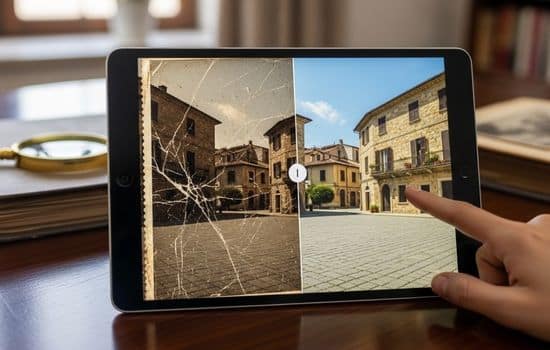
✨ Transforming Memories Into Lasting Treasures
Photo restoration applications democratize technology once available only to professional archivists and expensive specialists. Now anyone with a smartphone can rescue precious memories from the deterioration that threatens every old photograph.
The process rewards patience and experimentation. Your first attempts may not achieve perfection, but each project teaches valuable skills. Soon you’ll instinctively know which tools address specific damage types and how to coax maximum quality from challenging sources.
Start with less precious images to practice before tackling irreplaceable family heirlooms. Build confidence with the software, understand its capabilities and limitations, and develop your personal restoration style.
Remember that restoration doesn’t require making images look modern. Sometimes the goal is simply stabilizing deterioration and improving clarity while maintaining authentic period character. Your restored photographs should look like better-preserved versions of themselves, not like they were taken yesterday.
These applications offer more than technical solutions—they provide opportunities to engage meaningfully with family history, connect generations, and ensure that the faces and moments that shaped your family’s story remain visible for decades to come. Every photograph you restore is a gift to the future, a window into the past that might otherwise have closed forever.
The tools exist, the technology is accessible, and your family’s visual legacy awaits preservation. There’s never been a better time to begin restoring those old photographs collecting dust in albums and boxes, transforming them into vivid memories that will inspire and connect your family for generations ahead.
